Helpdesk
 Solution Center








Leading customers such as Bosch, BMW, Mercedes-Benz, Schaeffler, Infineon, T-Systems and many more rely on agosense.symphony
 agosense.symphony
ServiceNow Azure DevOps Integration: connect ITSM and development end-to-end
Incidents and change requests from ServiceNow arrive automatically as work items in Azure DevOps – bidirectionally synchronized, with no manual handoffs. agosense.symphony connects your ITSM with your development platform via dedicated adapters: configurable, scalable and extensible across your entire toolchain.
✓ Bidirectional & real-time
✓ 150+ customer projects
✓ 15+ years of experience
✓ Made in Germany

- ✓ Incidents & change requests synchronized automatically
- ✓ Work items, status & comments bidirectional
- ✓ Configurable triggers & field mapping
- ✓ ITIL-compliant & audit-ready
Background
Two systems, one gap – a challenge most teams know
ServiceNow is the central IT service management platform for many organizations: service requests are processed here, incidents are classified, change requests managed. Microsoft Azure DevOps is on the other side – the platform for development teams, with boards, backlogs, CI/CD pipelines and code repositories in one integrated environment.
In practice, there is often a gap between the two. A ticket that first-level support identifies as a software defect has to be handed off to development manually: by email, screenshot, chat or phone. Status updates travel the same way back. That costs time every day – and frequently double the effort, because the same information has to be maintained in both systems by hand.
The consequences are familiar: outdated status entries, missing traceability and communication that happens outside the toolchain. For organizations in regulated industries such as Automotive, Aerospace or Medical Devices, this is compounded by the fact that every change request must be fully documented and traceable – which simply rules out manual handoffs.
This is exactly where the ServiceNow Azure DevOps Integration with agosense.symphony comes in: data flows automatically and rule-based between both systems – reliably, audit-ready and scalable across your entire tool landscape.
Technology
The agosense.symphony ServiceNow Azure DevOps Integration: flexible, scalable, enterprise-ready
agosense.symphony acts as middleware between ServiceNow and Microsoft Azure DevOps: both systems retain their familiar interface and process logic – the data exchange between them runs fully automated via configurable adapters. Triggers, field mapping and synchronization direction can all be set up without any programming through a graphical interface, and adjusted at any time.
ServiceNow
Incident · Change Request · Problem · Service Request
agosense.symphony
Field mapping · Triggers · Conflict management · Monitoring
Azure DevOps
Work Item · Bug · Task · Epic
Field mapping: every field, every logic
Standard fields such as priority, status and description, as well as custom fields from both systems, can be mapped freely to one another – including value transformation when labels differ between ServiceNow and Azure DevOps.
Triggers: synchronization on your terms
You decide when and what gets synchronized: on status changes, for specific ticket types or based on freely definable conditions. Only relevant records flow through – no data noise, no unnecessary clutter in the Azure DevOps board.
Conflict management: rule-based & traceable
If both sides update the same record simultaneously, the configured conflict management kicks in. No data loss, no silent overwriting – every decision is logged and fully traceable.
Monitoring: complete logging
All synchronization processes are centrally logged. Errors, status changes and data flows are visible in the dashboard – including for audits in regulated projects under ISO 26262, DO-178C or IEC 62304.
How would the ServiceNow Azure DevOps Integration work in your environment?
Tell us about your current tool landscape – our integration experts will walk you through how agosense.symphony connects ServiceNow and Azure DevOps in your specific setup, which fields get mapped and which triggers make sense for your processes. Proof of concept or test installation available afterwards if needed. No cost, no commitment, but a clear picture of what is possible.
Book a free analysis call →
Synchronization in detail
ServiceNow
Azure DevOps
What the ServiceNow Azure DevOps Integration actually transfers
agosense.symphony synchronizes all relevant objects and fields between ServiceNow and Azure DevOps – bidirectionally, in individually configurable depth and without manual intervention. The mapping is fully customizable: from standard fields to custom fields in both systems.
ServiceNow
IncidentDisruption or defect in operation
Object
Change RequestPlanned change to the system
Object
ProblemRoot cause of recurring incidents
Object
Service RequestUser-initiated service request
Object
Short desc. / Priority / StateStandard fields
Field
Comments & AttachmentsFull history
Field
Custom FieldsIndividually configurable
Custom
Azure DevOps
Object
Bug / TaskDevelopment task or defect
Object
Epic / FeatureHigher-level development unit
Object
BugReproducible software defect
Object
Task / User StorySprint backlog item
Field
Title / Priority / StateStandard fields
Field
Comments & AttachmentsFull history
Custom
Custom FieldsIndividually configurable
Real-time synchronization
Changes are transferred immediately – no polling delays, no manual trigger required.
Filter rules & triggers
Only relevant records flow through – configurable by ticket type, status, team or any field value.
Audit-ready & ITIL-compliant
All synchronization processes are fully logged – for audits in regulated projects.
Typical use cases
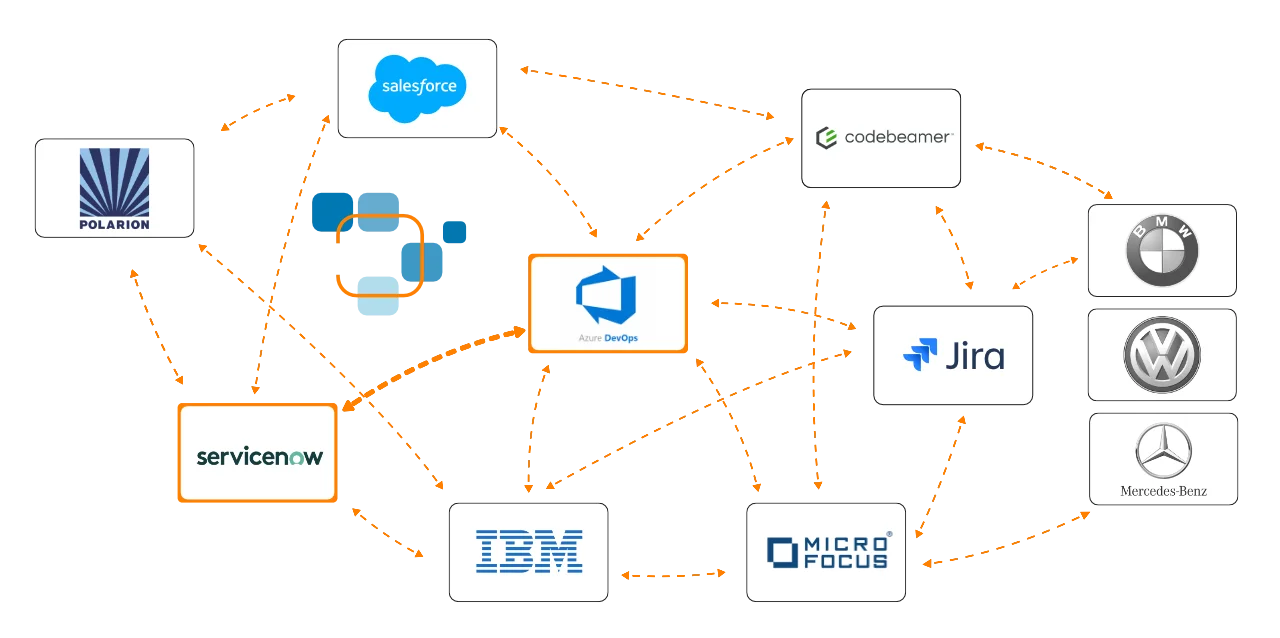
Typical use cases for the ServiceNow Azure DevOps Integration
Incident Management
From support ticket to work item – without manual intervention
Without integration
Support classifies an incident in ServiceNow as a software defect and hands it off to development by email. A work item is created manually – with the risk that fields are missing, priorities are misaligned or the issue simply gets lost in the process.
With agosense.symphony
As soon as an incident meets the defined trigger, agosense.symphony automatically creates a work item in Azure DevOps – with all fields, comments and attachments. Status changes flow back to ServiceNow immediately. Both teams stay in their own tool.
Change Management
Trace change requests end-to-end into the development workflow
Without integration
An approved change request in ServiceNow has to be manually recreated in Azure DevOps. The link between the ITSM process and the development task is not machine-documented – a critical issue during audits under ISO 26262, DO-178C or IEC 62304.
With agosense.symphony
Every approved change request automatically creates a linked work item in Azure DevOps. Traceability from the ITSM ticket to the development step is fully logged – audit-ready for regulated projects in Automotive, Aerospace and Medical Devices.
Integration overview
ServiceNow and Azure DevOps as part of a central toolchain
agosense.symphony does not just connect ServiceNow with Azure DevOps – the platform is designed to integrate your entire toolchain. Additional ALM tools can be connected via the same instance: Codebeamer, Jira, IBM EWM, Siemens Polarion and others. New tools are added as adapters without touching existing integrations. One central configuration, one monitoring dashboard, one platform – today and tomorrow.
Advantages
ServiceNow Azure DevOps Integration with agosense.symphony: advantages at a glance
| Feature | agosense.symphony |
|---|---|
| Synchronization direction | Bidirectional, real-time |
| Supported Azure DevOps variants | Azure DevOps Services (Cloud) & Azure DevOps Server (On-Premise) |
| Supported ServiceNow objects | Incidents, Change Requests, Problems & Service Requests |
| Configuration | Point & Click, no coding required |
| Triggers | Time-based, event-based or manual – freely configurable |
| Field mapping & data logic | Standard & custom fields, comments, attachments, value transformation |
| Conflict handling | Rule-based, fully logged |
| Monitoring & logging | Central dashboard, complete logging of all synchronization processes |
| ITIL compliance | Change management, approval-based workflows & complete audit trail |
| Traceability | End-to-end traceable, mappable to ISO 26262, DO-178C & IEC 62304 |
| Deployment | On-premise & cloud – matching your IT policy and security requirements |
| Scalability | Enterprise-ready, multi-instance, multi-project |
| Extensibility | 50+ adapters – extendable with additional ALM and ITSM tools at any time |
| Origin & experience | Made in Germany · 15+ years of experience in regulated environments |
| Customer projects | More than 150 successfully completed |
Synchronization direction
Bidirectional, real-time
Supported Azure DevOps variants
Azure DevOps Services (Cloud) & Azure DevOps Server (On-Premise)
Supported ServiceNow objects
Incidents, Change Requests, Problems & Service Requests
Configuration
Point & Click, no coding required
Triggers
Time-based, event-based or manual – freely configurable
Field mapping & data logic
Standard & custom fields, comments, attachments, value transformation
Conflict handling
Rule-based, fully logged
Monitoring & logging
Central dashboard, complete logging of all synchronization processes
ITIL compliance
Change management, approval-based workflows & complete audit trail
Traceability
End-to-end traceable, mappable to ISO 26262, DO-178C & IEC 62304
Deployment
On-premise & cloud – matching your IT policy and security requirements
Scalability
Enterprise-ready, multi-instance, multi-project
Extensibility
50+ adapters – extendable with additional ALM and ITSM tools at any time
Origin & experience
Made in Germany · 15+ years of experience in regulated environments
Customer projects
More than 150 successfully completed
References
What customers say about agosense.symphony
Deciding which integration platform to deploy across a large development organization carries significant responsibility.
That is why real-world experience speaks louder than any promise:
“
agosense.symphony is an indispensable part of our integration environment. The platform enables us to implement complex and secure integrations – both between internal systems and to customer systems – and to operate them reliably in the long term. The result: consistent data synchronization and a uniformly high quality of service for our customers.
“

Internal and cross-company integrations will be key priorities for IT in the coming years. With an open integration platform like agosense.symphony, we hope to be well prepared for the future.
FAQ
Frequently asked questions about the ServiceNow Azure DevOps Integration
Yes. agosense.symphony supports both Azure DevOps Services (Cloud) and Azure DevOps Server (On-Premise). Different ServiceNow release versions and instance types are also supported – without separate installations or licenses.
Incidents, change requests, problems and service requests including all relevant fields, comments and attachments – bidirectionally. The field mapping is fully customizable, including custom fields and value transformations for labels that differ between the two systems.
Yes. agosense.symphony does not interfere with ServiceNow or Azure DevOps itself. Both systems continue to run as usual – with their existing processes, user roles and interfaces. Only the data flows between them are automated.
Simple scenarios can be configured and go live within a few days. More complex enterprise environments with individual field mappings, approval workflows and multi-project setups are planned as a project and rolled out step by step. In customer projects, agosense has demonstrated a fully configured solution in a proof-of-concept within two days.
Yes. agosense.symphony maps ITIL processes within the integration – including approval-based workflows, defined status transitions and complete auditability. This makes the integration particularly well suited for regulated environments in Automotive, Aerospace and Medical Devices.
Yes. agosense.symphony is a platform with an adapter architecture. ServiceNow can also be connected to Codebeamer, Jira, IBM EWM, Siemens Polarion or other tools via the same instance – without setting up separate integrations. A full overview of available adapters can be found in the integrations overview.
Yes. agosense.symphony has been deployed in numerous projects in regulated development environments. Complete logging of all synchronization processes and end-to-end traceability are core components of the platform – ideal for Automotive (ASPICE, ISO 26262), Medical Devices (IEC 62304) and Aerospace (DO-178C).
Licensing costs depend on the chosen license model and the number of connected systems. Contact us directly – we will put together an individual quote for you, with a free analysis call upfront if needed.
Connect ServiceNow and Azure DevOps seamlessly – get started with agosense.symphony today
We analyse your tool landscape, discuss your individual situation and show you how agosense.symphony connects ServiceNow and Azure DevOps in your specific environment – backed by more than 15 years of experience and over 150 successfully completed integration projects.
✓ Free analysis call
✓ Discuss your individual situation
✓ Proof of concept available
✓ Test installation available
No cost, no commitment – but a clear picture of what the ServiceNow Azure DevOps Integration can do for your teams.
Or use our contact form directly