Helpdesk
 Solution Center








Leading customers such as Bosch, BMW, Mercedes-Benz, Schaeffler, Infineon, T-Systems and many more rely on agosense.symphony
 agosense.symphony
Jira Azure DevOps Integration: connect agile planning and Microsoft development end-to-end
Jira issues and Azure DevOps work items stay in sync in real time – bidirectionally, with no manual effort. agosense.symphony connects Atlassian Jira with Azure DevOps via dedicated adapters: your backlog management in Jira stays intact, your development in Azure DevOps runs undisturbed – and both systems speak the same language. Configurable, scalable and extensible across your entire toolchain.
✓ Bidirectional & real-time
✓ Jira Cloud, Data Center & Server
✓ 15+ years of experience
✓ Made in Germany


- ✓ Epics, stories & bugs synchronized automatically
- ✓ Work items, status & comments bidirectional
- ✓ Sprint data & work item hierarchy mapped
- ✓ Branches, commits & build status back to Jira
Background
Jira and Azure DevOps: two worlds, one gap
Atlassian Jira is the tool of choice for agile project management in many development organizations: backlogs, sprints, epics and issue tracking all run centrally in Jira. Microsoft Azure DevOps is on the other side of the equation – the enterprise standard for developers, with Azure Boards, Azure Repos, CI/CD pipelines and a fully integrated DevOps infrastructure in one environment.
In practice, both worlds frequently coexist side by side. Product management plans in Jira, development works in Azure DevOps. The gap between them is well known: progress from Azure Boards does not automatically appear in Jira – status updates, comments and information about commits and branches have to be transferred manually or communicated by email. That costs time every day and creates inconsistencies across both systems.
The native solution from Atlassian – the Azure DevOps for Jira plugin from the Marketplace – only transfers development information such as commits and branches in one direction, into Jira Cloud. It supports neither Jira Data Center nor Jira Server, offers no bidirectional work item synchronization and provides no individual field mapping or configurable triggers. For enterprise environments with specific processes, regulated requirements or on-premise installations, that simply is not enough.
This is exactly where the Jira Azure DevOps Integration with agosense.symphony comes in: bidirectional synchronization of Jira issues and Azure DevOps work items – in configurable depth, for Jira Cloud, Data Center and Server, with full control over field mapping, triggers and data logic.
Technology
The agosense.symphony Jira Azure DevOps Integration: flexible, scalable, enterprise-ready
agosense.symphony acts as middleware between Atlassian Jira and Azure DevOps: both systems retain their familiar interface and process logic – the data exchange between them runs fully automated via dedicated adapters. Triggers, field mapping and synchronization direction can all be set up without any programming through a graphical interface, and adjusted at any time.
Jira
Epic · Story · Bug · Task · Subtask
agosense.symphony
Field mapping · Triggers · Conflict management · Monitoring
Azure DevOps
Epic · Feature · User Story · Bug · Task
Issue types & story points: Jira fields fully mapped
Jira-specific fields such as issue type, story points, epic link, fix version and sprint assignment can be mapped directly to Azure DevOps fields – including value transformation. What Jira calls "story points" arrives in Azure DevOps as "effort". Fully configurable, without writing a single line of code.
Workflow transitions as triggers
Jira workflow transitions – for example from "In Review" to "Done" – can be configured directly as synchronization triggers. A status change in Jira flows immediately as a state update into the Azure DevOps work item. Sprint changes, label updates or new comments can equally serve as triggers.
Epic-story-task hierarchy: structure preserved
The full Jira hierarchy from epic through story to task and subtask is mapped in Azure DevOps – including parent-child relationships and issue links. Sprints are mapped to Azure DevOps iterations; area path and iteration path remain freely configurable.
Monitoring: full transparency over every sync
All synchronization processes are centrally logged – including failed transitions and conflicts between parallel changes. The dashboard shows data flows in real time and delivers the audit trail depth that regulated projects under ISO 26262, DO-178C or IEC 62304 require.
How would the Jira Azure DevOps Integration work in your environment?
Tell us about your current tool landscape – our integration experts will walk you through how agosense.symphony connects Jira and Azure DevOps in your specific setup, which fields get mapped and which triggers make sense for your processes. Proof of concept or test installation available afterwards if needed. No cost, no commitment, but a clear picture of what is possible.
Book a free analysis call →
Synchronization in detail
Jira
Azure DevOps
What the Jira Azure DevOps Integration actually synchronizes
agosense.symphony transfers all relevant objects and fields between Jira and Azure DevOps – bidirectionally, in configurable depth and without manual intervention. The field mapping is fully customizable: from standard fields through to custom fields in both systems, including comments, attachments and issue links.
Jira
EpicTop-level development unit
Object
StoryUser-facing requirement
Object
BugReproducible software defect
Object
Task / SubtaskWork item or sub-item
Object
Summary / Priority / StatusStandard fields
Field
Comments & attachmentsFull history
Field
Custom fieldsIndividually configurable
Custom
Azure DevOps
Object
EpicTop-level development unit
Object
User Story / PBIUser requirement in backlog
Object
BugReproducible software defect
Object
Task / FeatureDevelopment task or feature
Field
Title / Priority / StateStandard fields
Field
Comments & attachmentsFull history
Custom
Custom fieldsIndividually configurable
Real-time synchronization
Changes are transferred immediately – no polling delays, no manual trigger required.
Sprint & work item hierarchy
Jira sprints, iterations and the full hierarchy from epic to subtask remain traceable across system boundaries.
Traceability & audit-ready
All synchronization processes are fully logged – for audits in regulated projects under ISO 26262, DO-178C or IEC 62304.
Use cases
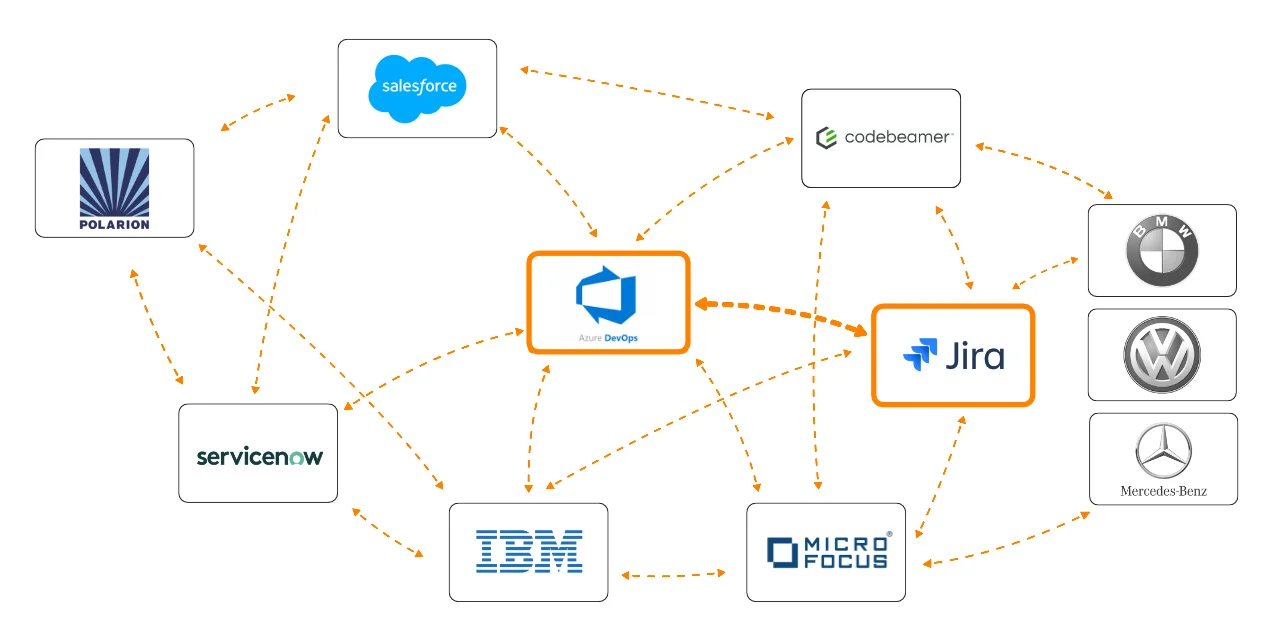
Typical use cases for the Jira Azure DevOps Integration
Agile sprint management
Jira backlog and Azure DevOps Boards: one consistent view for all teams
Without integration
Product owners maintain the backlog in Jira while developers create parallel work items in Azure DevOps Boards. Sprint status and progress information remain separate – stakeholders need access to both systems, and status requests end up in Slack or by email.
With agosense.symphony
agosense.symphony automatically transfers Jira epics, stories and bugs as work items to Azure DevOps. Status changes and comments flow bidirectionally. The product owner sees sprint progress directly in Jira – without ever opening Azure DevOps.
Enterprise transformation
Introducing Azure DevOps – without giving up Jira
Without integration
The organization introduces Azure DevOps for CI/CD and build management while Jira remains in use as the project management tool. Without integration, both systems run decoupled: status updates are maintained twice, and information about commits and branches never reaches Jira issues.
With agosense.symphony
agosense.symphony synchronizes work items and Jira issues bidirectionally – branches, commits and deployment status from Azure Pipelines flow back to Jira automatically. Both teams stay in their familiar environment while the data stays consistent.
Integration overview
Jira and Azure DevOps as part of a central toolchain
agosense.symphony does not just connect Jira with Azure DevOps – the platform is designed to integrate your entire toolchain. Additional tools can be connected via the same instance: Codebeamer, IBM EWM, ServiceNow, Siemens Polarion and others. New tools are added as adapters without touching existing integrations. One central configuration, one monitoring dashboard, one platform – today and tomorrow.
Webinar recording
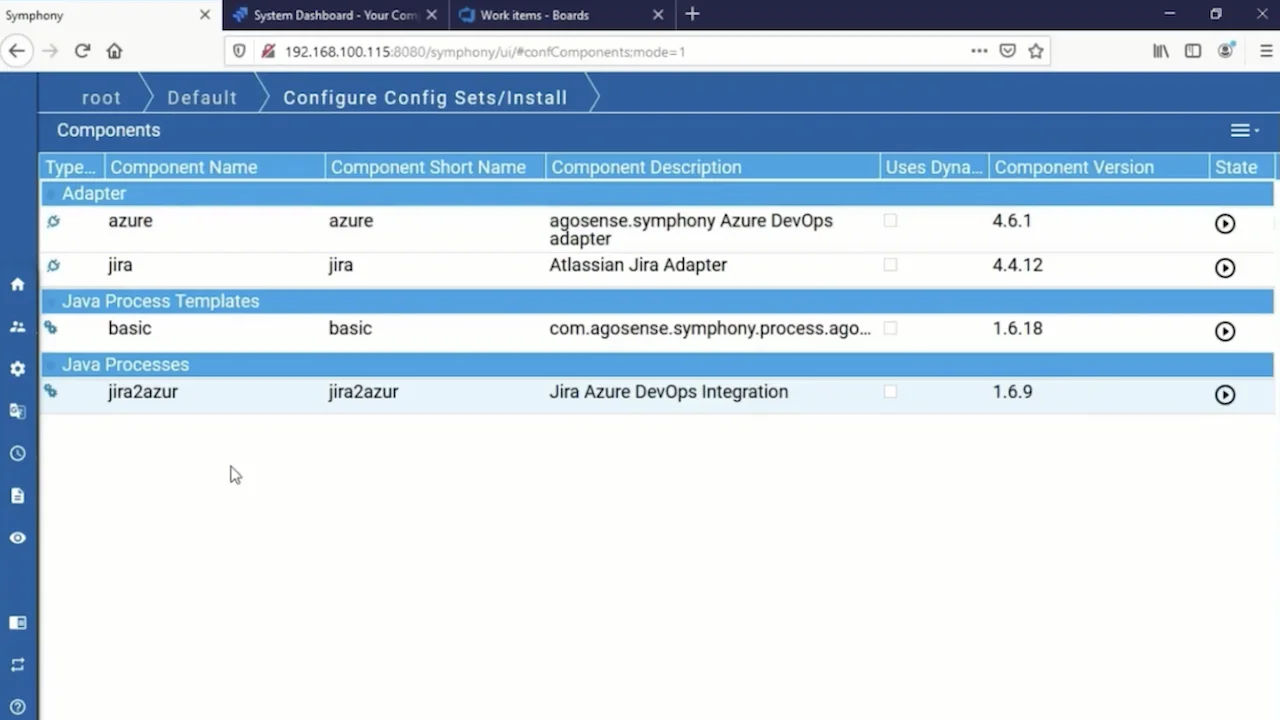
Jira Azure DevOps Integration live – see it in action
The following excerpt from a recorded agosense webinar shows how agosense.symphony connects Jira and Azure DevOps in practice – from configuring the field mapping through to live bidirectional synchronization.
Benefits
Jira Azure DevOps Integration with agosense.symphony: benefits at a glance
| Feature | agosense.symphony |
|---|---|
| Synchronization direction | Bidirectional, real-time |
| Supported Jira variants | Jira Cloud, Jira Data Center & Jira Server |
| Supported Azure DevOps variants | Azure DevOps Services (Cloud) & Azure DevOps Server (on-premise) |
| Supported Jira objects | Epics, stories, bugs, tasks & subtasks |
| Configuration | Point & click, no programming skills required |
| Triggers | Time-based, event-based or manual – freely configurable |
| Field mapping & data logic | Standard & custom fields, comments, attachments, value transformation |
| Sprint & hierarchy | Full mapping of sprints, iterations and work item hierarchies |
| Conflict handling | Rule-based, fully logged |
| Monitoring & logging | Central dashboard, complete logging of all sync processes |
| Traceability | End-to-end traceable, mappable for ISO 26262, DO-178C & IEC 62304 |
| Deployment | On-premise & cloud – aligned with your IT policy and security requirements |
| Scalability | Enterprise-ready, multi-instance, multi-project |
| Extensibility | 50+ adapters – extendable with additional ALM and ITSM tools at any time |
| Origin & experience | Made in Germany · 15+ years of experience in regulated environments |
| Customer projects | More than 150 successfully completed |
Synchronization direction
Bidirectional, real-time
Supported Jira variants
Jira Cloud, Jira Data Center & Jira Server
Supported Azure DevOps variants
Azure DevOps Services (Cloud) & Azure DevOps Server (on-premise)
Supported Jira objects
Epics, stories, bugs, tasks & subtasks
Configuration
Point & click, no programming skills required
Triggers
Time-based, event-based or manual – freely configurable
Field mapping & data logic
Standard & custom fields, comments, attachments, value transformation
Sprint & hierarchy
Full mapping of sprints, iterations and work item hierarchies
Conflict handling
Rule-based, fully logged
Monitoring & logging
Central dashboard, complete logging of all sync processes
Traceability
End-to-end traceable, mappable for ISO 26262, DO-178C & IEC 62304
Deployment
On-premise & cloud – aligned with your IT policy and security requirements
Scalability
Enterprise-ready, multi-instance, multi-project
Extensibility
50+ adapters – extendable with additional ALM and ITSM tools at any time
Origin & experience
Made in Germany · 15+ years of experience in regulated environments
Customer projects
More than 150 successfully completed
References
What customers say about agosense.symphony
Deciding which integration platform to deploy across a large development organization carries real responsibility.
That is why real-world experience is more convincing than any promise:
„
agosense.symphony is an indispensable component of our integration environment. The platform enables us to implement complex and secure integrations – both between internal systems and with customer systems – and to operate them reliably over the long term. The result: consistent data synchronization and a uniformly high quality of service for our customers.
„

Internal and cross-company integrations will be a key focus of IT in the coming years. With an open integration platform like agosense.symphony, we hope to be well equipped for the future.
FAQ
Frequently asked questions about the Jira Azure DevOps Integration
agosense.symphony supports Jira Cloud, Jira Data Center and Jira Server. This makes the Integration suitable for organizations that are still running on-premise installations – or planning a migration between Jira variants. The native Atlassian plugin, by contrast, supports Jira Cloud only.
agosense.symphony maps Jira sprints to Azure DevOps iterations while preserving the full work item hierarchy – from epic through story to task and subtask. Parent-child relationships and issue links are retained. Changes to sprint assignments or hierarchy relationships in one system are automatically transferred to the other.
Yes. Jira-specific fields such as story points, epic link, fix version, labels and sprint assignment can be mapped freely to Azure DevOps fields – for example, story points to effort in Azure Boards. The field mapping is fully configurable, including value transformation for fields with different names in each system.
Yes. agosense.symphony is project-type agnostic and works with both Jira Scrum projects and Kanban boards. The synchronization logic is configured per project – so different project structures and workflows can be mapped in parallel within the same integration.
The native plugin only transfers development information such as commits and branches in one direction – from Microsoft Azure DevOps to Jira Cloud. agosense.symphony offers fully bidirectional work item synchronization, supports Jira Cloud, Data Center and Server, enables individual field mapping with value transformation, configurable triggers and complete logging of all sync processes.
Straightforward scenarios can be configured and go live within a few days. More complex enterprise environments with individual field mappings, multiple projects and specific trigger logic are planned as a project and rolled out step by step. In customer projects, agosense has been able to demonstrate a fully configured solution within two days as part of a proof of concept.
Yes. agosense.symphony is a platform with an adapter architecture. Jira can also be connected via the same instance to Codebeamer, IBM EWM, ServiceNow, Siemens Polarion or other tools – without setting up separate integrations. An overview of all available adapters is available in the integrations overview.
Yes. agosense.symphony has been deployed in numerous projects in regulated development environments. Complete logging of all synchronization processes and end-to-end traceability are core features of the platform – ideal for Automotive (ASPICE, ISO 26262), Medical Devices (IEC 62304) and Aerospace (DO-178C).
Connect Jira and Azure DevOps seamlessly – get started with agosense.symphony
We analyze your tool landscape, discuss your individual situation and show you how agosense.symphony connects Jira and Azure DevOps in your environment – backed by more than 15 years of experience and over 150 successfully completed integration projects.
✓ Free analysis call
✓ Discuss your specific situation
✓ Proof of concept available
✓ Test installation available
No cost, no commitment – but a clear picture of what the Jira Azure DevOps Integration can make possible for your teams.
Or use our contact form directly