
 Helpdesk
 Solution Center










Leading customers worldwide including Bosch, BMW, Mercedes-Benz, VW, Continental, Infineon, Schaeffler and many more trust agosense.symphony
 agosense.symphony
Salesforce Jira Integration: Sales, support and development seamlessly connected
No more manual ticket transfers and status gaps between CRM and development. agosense.symphony is more than a rigid Salesforce Jira Connector: the integration platform connects both systems via dedicated adapters bidirectionally – fully automated, scalable and extendable across your entire tool landscape.
✓ Jira Data Center, Server & Cloud
✓ 150+ customer projects
✓ 15+ years of experience
✓ Made in Germany


- ✓ Tickets, status & comments synchronized
- ✓ Bidirectional & in real time
- ✓ Configurable triggers & field mapping
- ✓ Extendable for multi-tool scenarios
Background
Why a Salesforce Jira Integration makes a real difference
Salesforce and Jira are firmly established in many organisations: Salesforce as the CRM and ITSM platform for sales and support, Jira as the central management tool for software development. Both systems generate valuable data every day – yet without integration, this data exists in separate silos that barely communicate with each other.
The consequences are familiar: support tickets have to be manually re-created in Jira, feature requests from sales reach development by email or word of mouth, and whether a reported bug fix has actually been completed is something the account manager only finds out after a follow-up request. Duplicated effort, delays and a lack of transparency across team boundaries are the result – even though both sides are fundamentally pursuing the same goals.
Unlike a rigid Jira Salesforce Connector, a seamless integration via agosense.symphony solves this problem at a structural level: data is no longer transferred manually, but flows automatically and rule-based between systems – reliably, traceably and scalably across your organisation's entire tool landscape.
Integration platform vs. rigid Connector
Why an integration platform is superior to a rigid Salesforce Jira Connector
When teams look for a solution for their Salesforce Jira Integration, they often encounter native connectors or low-code platforms like Zapier first. These approaches connect two tools – but they create a rigid point-to-point connection that quickly reaches its limits in enterprise environments. agosense.symphony works in a fundamentally different way: instead of a fixed connector between Salesforce and Jira, there is a dedicated adapter per tool. Both adapters are connected via the integration platform – and can be extended with further tools at any time.
Flexibility: From two tools to a complete toolchain
Anyone connecting Salesforce and Jira via a rigid connector today will have to buy, implement and maintain a new connector tomorrow when a third tool is added. With agosense.symphony, the existing Salesforce adapter and Jira adapter are simply extended by a Codebeamer, Polarion or ServiceNow adapter – all via the same platform, the same monitoring, the same configuration logic.
Future-proof: Adapter updates instead of custom development
Salesforce and Jira regularly release new versions – major releases, API changes, new field structures. With a custom-built connector, every update means internal maintenance effort. The adapters of agosense.symphony are kept up to date by the vendor: when Jira Data Center releases a new version, the adapter is updated accordingly. Your integration keeps working – without any internal development effort.
All Jira variants in one solution
A common problem with native connectors: they only support Jira Cloud, not Jira Data Center or Jira Server – exactly the variants that dominate in regulated industries and large development organisations. The Jira adapter of agosense.symphony supports all three variants: Jira Data Center, Jira Server and Jira Cloud.
No vendor lock-in
A rigid Salesforce Jira Connector ties you to a single two-tool connection. agosense.symphony relies on an open, extensible architecture: adapters are modular, integration processes are individually configurable, and the platform can be operated both on-premise and in hybrid environments. You retain full control over your tool landscape.
Central monitoring for all integrations
With a single connector between Salesforce and Jira, you have no overarching monitoring. With agosense.symphony, all data transfers – between Salesforce, Jira and all other connected systems – are monitored, logged and reported centrally via a single dashboard. One interface for your entire integration infrastructure.
Enterprise-ready: Built for large development organisations
agosense.symphony is designed from the ground up for large development environments: not as a local point-to-point installation for individual users, but as an enterprise-wide integration platform that is centrally implemented, operated and managed. Whether 50 or 5,000 users, whether two or twelve integrated systems – the platform scales with you.
Scalability: Grows with your tool landscape
New systems are connected as additional adapters without affecting existing integrations. More users do not require a relaunch, only a licence adjustment. The platform remains the same system – your tool landscape can evolve.
Centralised control of processes and workflows
Process requirements, field mappings and transfer rules are centrally configured and versioned in agosense.symphony – not scattered across local scripts, but documented and manageable in a single, auditable platform. A decisive advantage for regulated industries such as automotive, medical technology or aerospace, where traceability and compliance are not optional but mandatory.
Technology
How agosense.symphony connects Salesforce and Jira – and why this is no ordinary connector
agosense.symphony acts as middleware between Salesforce and Jira, ensuring that data is transferred reliably, completely and according to individually configurable rules. The setup is carried out via a graphical interface without any programming effort – while still offering full flexibility for complex requirements. All three Jira variants are supported: Jira Data Center, Jira Server and Jira Cloud.
Field mapping: Every field, every logic
You decide which fields are synchronised, transformed or ignored between Salesforce objects and Jira issues. Formulas, lookups and conditional mappings can be configured via a point-and-click interface – no programming skills required.
Triggers: Synchronisation on your terms
Time-controlled, event-based – for example triggered by a status change in Salesforce or Jira – or initiated manually. The integration adapts to your processes, not the other way around.
Conflict management: Rule-based & transparent
If conflicts arise from simultaneous changes in both systems, the platform resolves them according to predefined rules and documents every decision transparently in the dashboard.
Monitoring: Complete logging
Every synchronisation action is fully logged. The integrated dashboard gives you a complete view of which data was transferred, when and in which direction – including for compliance and audit purposes.
What would the Jira Salesforce Integration look like in your development process?
Tell us about your current tool landscape – our integration experts will discuss with you how a Salesforce Jira Integration can level up your daily work in your individual development environment. With a proof of concept or test installation to follow, if desired. No cost, no risk, but a clear picture of what is possible.
Book a free analysis call →
Comparison
Salesforce Jira Connector or integration platform – what fits your organisation?
A Jira Salesforce Connector solves a specific problem – but it only solves that one problem. In enterprise environments, where tool landscapes grow, versions change and processes need to be managed across the organisation, that is not enough. agosense.symphony offers the same starting point – synchronzing Salesforce and Jira – but on a platform built for more from the outset: more tools, more users, more control.
★ Recommended
| Criterion | Rigid Connector / Zapier | Custom development | agosense.symphony |
|---|---|---|---|
| Implementation effort | Low (initially) | Very high | Low |
| Maintenance effort | Medium | Very high | Low |
| Jira DC / Server / Cloud | Cloud only | Custom | All three |
| Transformation logic & field mapping | None | Custom | Comprehensive |
| Multi-tool integration | Not possible | Very complex | Pre-configured |
| Monitoring & audit trail | Limited | Custom | Comprehensive |
| Scalability | Low | Medium | High |
| Enterprise-wide deployment | Not designed for this | Complex | Centrally manageable |
| Central process configuration | Not possible | Very complex | Fully supported |
| Response to tool updates | Variable | Complex | Guaranteed by vendor |
Rigid Connector / Zapier
Implementation effortLow (initially)
Maintenance effortMedium
Jira DC / Server / CloudCloud only
Transformation logicNone
Multi-tool integrationNot possible
Monitoring & audit trailLimited
ScalabilityLow
Enterprise-wide deploymentNot designed for this
Central process configurationNot possible
Response to tool updatesVariable
Custom development
Implementation effortVery high
Maintenance effortVery high
Jira DC / Server / CloudCustom
Transformation logicCustom
Multi-tool integrationVery complex
Monitoring & audit trailCustom
ScalabilityMedium
Enterprise-wide deploymentComplex
Central process configurationVery complex
Response to tool updatesComplex
agosense.symphony ★ Recommended
Implementation effortLow
Maintenance effortLow
Jira DC / Server / CloudAll three
Transformation logicComprehensive
Multi-tool integrationPre-configured
Monitoring & audit trailComprehensive
ScalabilityHigh
Enterprise-wide deploymentCentrally manageable
Central process configurationFully supported
Response to tool updatesGuaranteed by vendor
Use Cases
Typical use cases for the Salesforce Jira Integration
Incident Management
Incident to bug: From customer support directly into development
Without integration
- Incidents in Salesforce manually re-created as bugs in Jira
- Status queries by email or phone
- Comments out of sync on both sides
- Support has no visibility of development progress
With agosense.symphony
- Incident is automatically created as a Jira bug
- Status updates flow bidirectionally in real time
- Comments and attachments in sync on both sides
- Support sees everything in Salesforce – without opening Jira
Feature Tracking
Feature requests: From sales into product development
Without integration
- Feature requests sent to development by email
- No tracking from request to delivery
- Sales often finds out about completion too late
With agosense.symphony
- Request from Salesforce is automatically created as a Jira ticket
- Full traceability from request to delivery
- Status feedback to sales in real time
Integration overview
How the Salesforce Jira Integration works with agosense.symphony
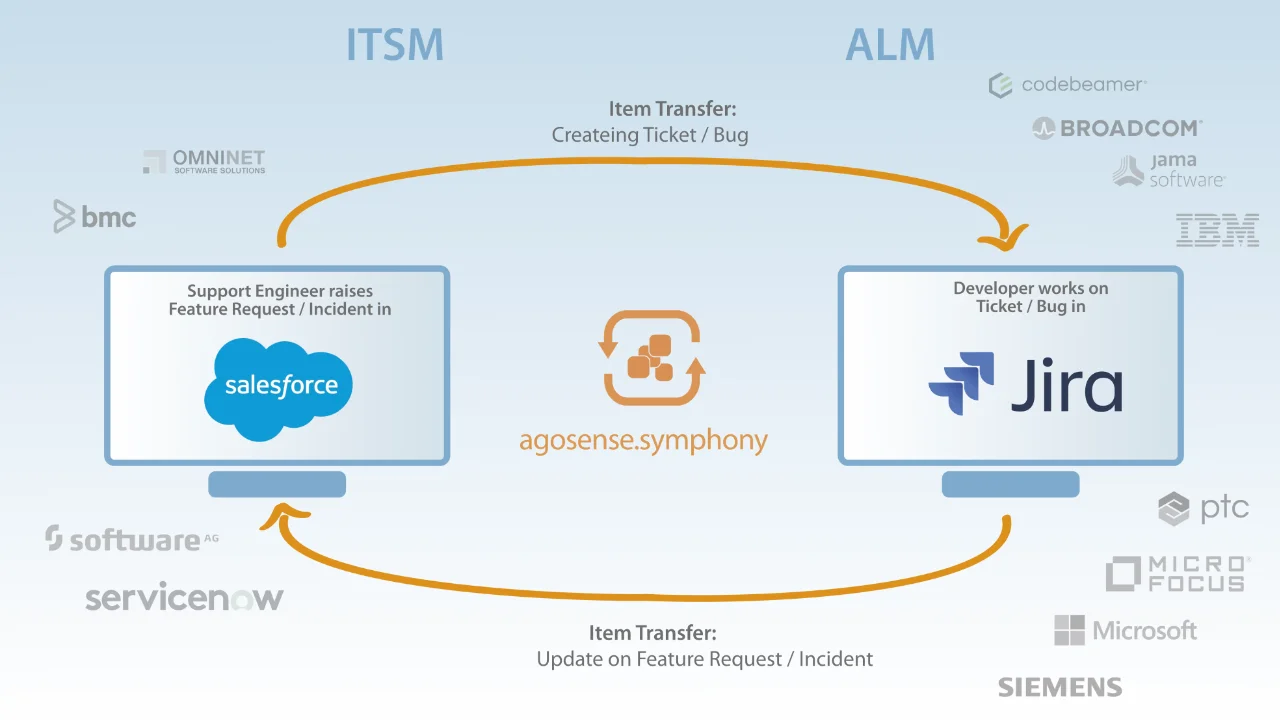
The diagram shows how agosense.symphony handles the two most common scenarios – from the Salesforce incident to the automatically created Jira bug, and from the feature request in sales to the Jira ticket in development. Bidirectional, rule-based and without manual intervention.
Multi-Tool Integration
Multi-tool scenarios: Salesforce as part of a complex toolchain
Without a central platform
- Multiple separate point-to-point connections
- No unified monitoring across all systems
- Every new integration is a separate project
- High maintenance effort with every tool update
With agosense.symphony
- Salesforce, Jira, Polarion, Codebeamer & more via one platform
- Central monitoring and logging for all integrations
- Add new systems easily without new infrastructure
- Vendor-maintained adapters for every tool update
agosense.symphony in practice
ITSM meets ALM: See a comparable integration live
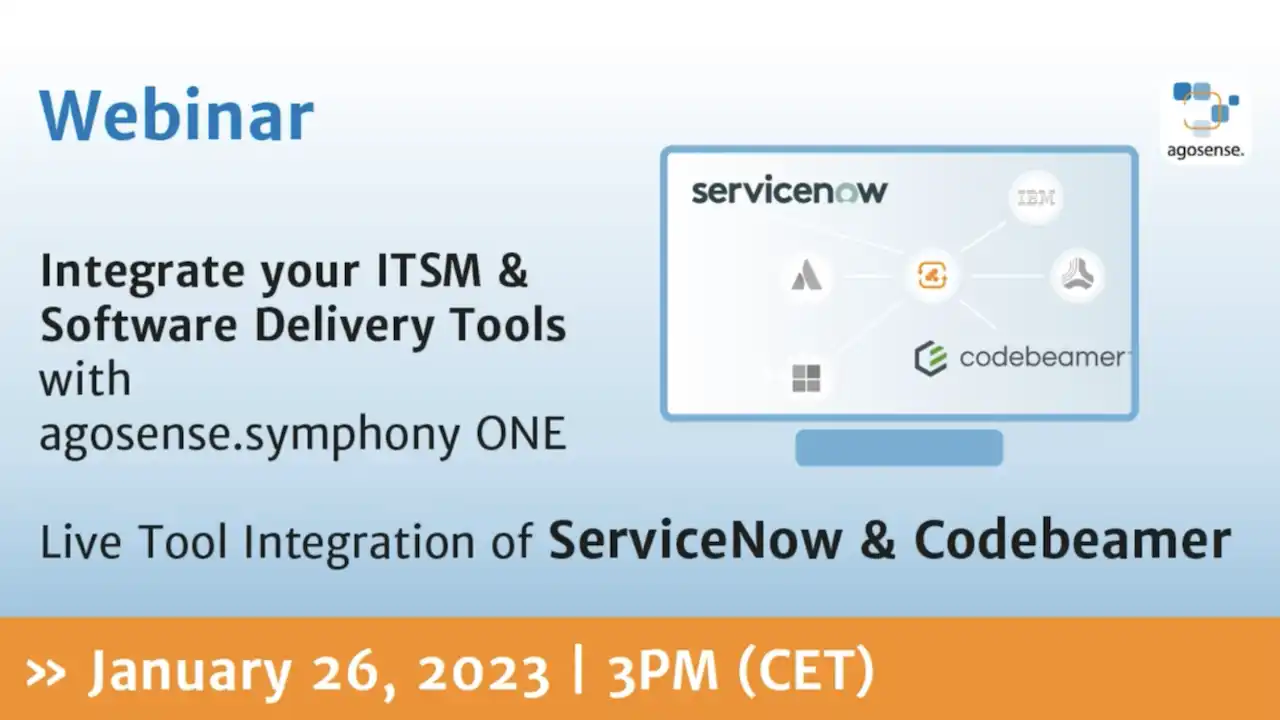
The Salesforce Jira Integration connects an ITSM system (Salesforce) with an ALM tool (Jira) – and this is exactly the scenario shown in practice in the following webinar extract: ServiceNow as the ITSM platform, Codebeamer as the ALM tool. Different product names, same mechanism. Configurable adapters, bidirectional data exchange, rule-based mapping – this is how agosense.symphony works, regardless of which tools are being connected.
Webinar extract
Integration of Codebeamer & ServiceNow from "Integrate your ITSM & Software Delivery Tools with agosense.symphony"
Supported systems
Salesforce Jira Integration: Supported tools and multi-tool scenarios
Synchronzing Salesforce and Jira is just the starting point – not the end. agosense.symphony makes it possible to connect Salesforce and Jira simultaneously with additional ALM, ITSM and requirements management systems, building a fully connected tool landscape.
IT Service Management (ITSM)
ALM & Requirements Management
Project management & Agile
Automotive OEM portals
Advantages
Jira Salesforce Integration with agosense.symphony: Key advantages at a glance
| Feature | agosense.symphony |
|---|---|
| Synchronisation direction | Bidirectional, in real time |
| Jira support | Data Center, Server & Cloud |
| Configuration | Point & click, no programming skills required |
| Triggers | Time-controlled, event-based or manual – freely configurable |
| Field mapping & data logic | Comments, file attachments, conditional mappings & Java transformations |
| Conflict management | Rule-based, fully logged |
| Monitoring & audit trail | Comprehensive, dashboard-based |
| Deployment | On-premise & hybrid models supported |
| Scalability | Enterprise-ready, multi-instance, multi-project |
| Extensibility | Multi-tool integration pre-configured – Codebeamer, Polarion, ServiceNow and more |
| OEM portal connectivity | Unique: BMW, Mercedes-Benz, Porsche, VW |
| Origin & experience | Made in Germany / Europe, over 15 years |
| Customer projects | Over 150 successfully completed |
Synchronisation directionBidirectional, in real time
Jira supportDC, Server & Cloud
ConfigurationPoint & click, no coding
TriggersTime-controlled, event-based, manual
Field mappingComments, attachments, mappings
Conflict managementRule-based, fully logged
Audit trailComprehensive, dashboard-based
DeploymentOn-premise & hybrid
ScalabilityEnterprise-ready, multi-instance
OEM portal connectivityUnique: BMW, MB, Porsche, VW
Origin & experienceMade in Germany, 15+ years
Customer projectsOver 150 successfully completed
References
What customers say about agosense.symphony
agosense brings more than 15 years of experience in integrating development tools – built and operated in Germany. Customers across a wide range of industries confirm that this works in practice:
“

Internal and cross-company integrations will be key IT priorities in the coming years. With an open integration platform like agosense.symphony, we hope to be well equipped for the future.
“

The modular and scalable concept of agosense.symphony, consisting of the bus technology and the individually adaptable adapters, has a future. Amadeus Germany is committed to it!
FAQ
Frequently asked questions about the Salesforce Jira Connector and Salesforce Jira Integration
A Salesforce Jira Connector is an integration interface that automatically synchronises Salesforce objects – such as cases, opportunities or incidents – with Jira issues. Status changes, comments and fields are transferred bidirectionally, without any manual data transfer between the systems.
agosense.symphony supports all three Jira variants: Jira Data Center, Jira Server and Jira Cloud. The integration can be individually configured for each variant and adapted to the specific requirements of the respective environment.
Native connectors and low-code platforms like Zapier often only offer simple, unidirectional data forwarding without transformation logic, without monitoring and without support for Jira Data Center. agosense.symphony, on the other hand, enables complex, bidirectional synchronisations with configurable field mapping, conflict management and comprehensive logging – including in regulated environments with high compliance requirements.
Yes. agosense.symphony is designed as a central integration platform and can connect Salesforce simultaneously with multiple ALM and ITSM systems – such as Jira, Codebeamer, Siemens Polarion, ServiceNow or Azure DevOps. All integrations run via a unified platform with central monitoring.
Configuration is carried out via a graphical interface and requires no programming skills. Field mappings, trigger rules and transformation logic are defined visually. agosense supports the implementation with professional guidance and adapts the integration individually to existing processes and system environments.
agosense.symphony can be operated on-premise within your own infrastructure, which is particularly relevant for organisations with high data protection or compliance requirements. Hybrid deployment models are also supported. agosense is a German company – development, hosting options and support are all based in Germany.
Your Salesforce Jira Integration – tailored and reliable
Whether it is a straightforward ticket synchronisation between support and development or a complex multi-tool integration across several systems: agosense.symphony adapts to your processes, not the other way around. With the Jira Salesforce Integration you create a shared data foundation for sales, support and development – automated, transparent and scalable across your organisation's entire tool landscape.
✓ Free analysis call
✓ Discuss your individual situation
✓ Proof of concept possible
✓ Test installation possible
No cost, no risk – but a clear picture of what is possible for your toolchain.
Or use our contact form directly

agosense GmbH
Stammheimer Strasse 10
70806 Kornwestheim
Germany
+49.7154.99951.0
mail@agosense.com
https://agosense.com
Stammheimer Strasse 10
70806 Kornwestheim
Germany
+49.7154.99951.0
mail@agosense.com
https://agosense.com
PRODUCTS & SOLUTIONS
AGOSENSE.SYMPHONY
DEVELOPMENT TOOL INTEGRATION
B2B DATA EXCHANGE
INTEGRATIONS
LICENSING
SOLUTION CENTER
AGOSENSE.SYMPHONY
DEVELOPMENT TOOL INTEGRATION
B2B DATA EXCHANGE
INTEGRATIONS
LICENSING
SOLUTION CENTER
This is agosense: Automation of data flows, value stream management, connection of development tools and ALM platforms, business-to-business data exchange, connection to OEM supplier platforms.
